ClustR – Display for Tesla
The driver display your car is missing.
Model 3 and Model Y have no display behind the wheel. ClustR puts one on your iPhone: mount it in landscape and see speed, gear, battery and range in your line of sight, over Bluetooth.
Independent app. Not affiliated with Tesla, Inc.

Faces
Choose how your cluster looks.
Swipe between faces, switch what each one shows, and make it yours.
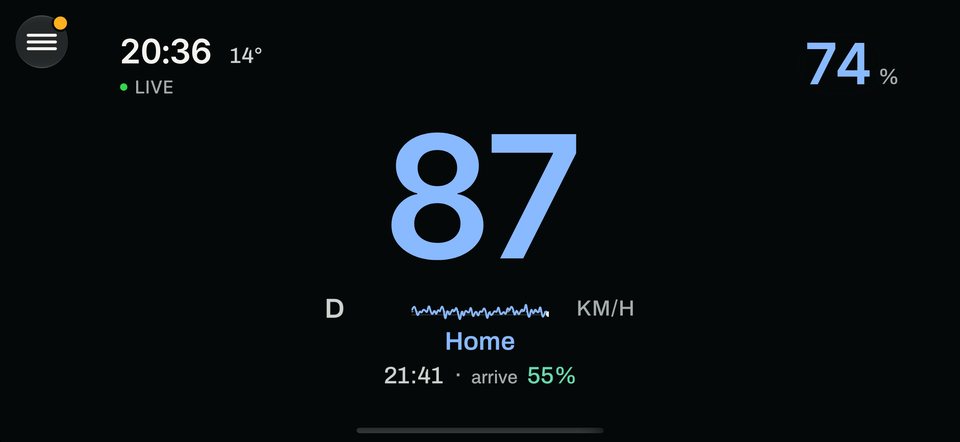
Glance · Free. A big, calm readout of speed, gear and battery. 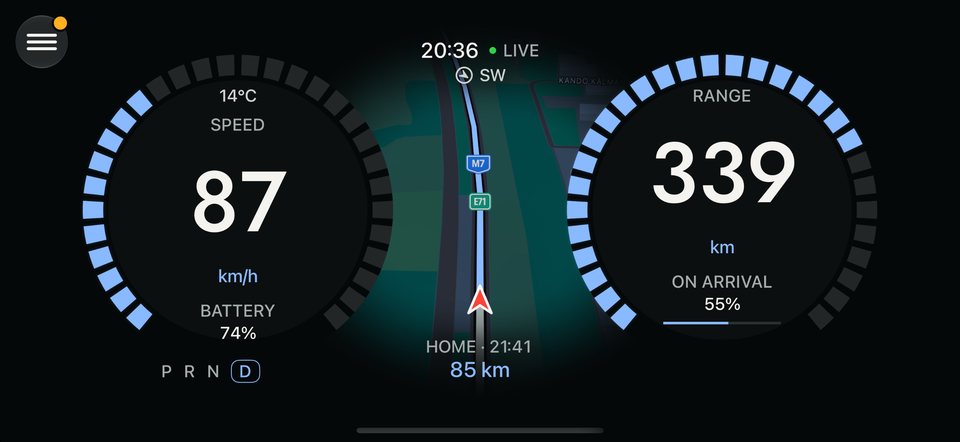
Twin Arc · Pro. Two arc gauges with the essentials between them. 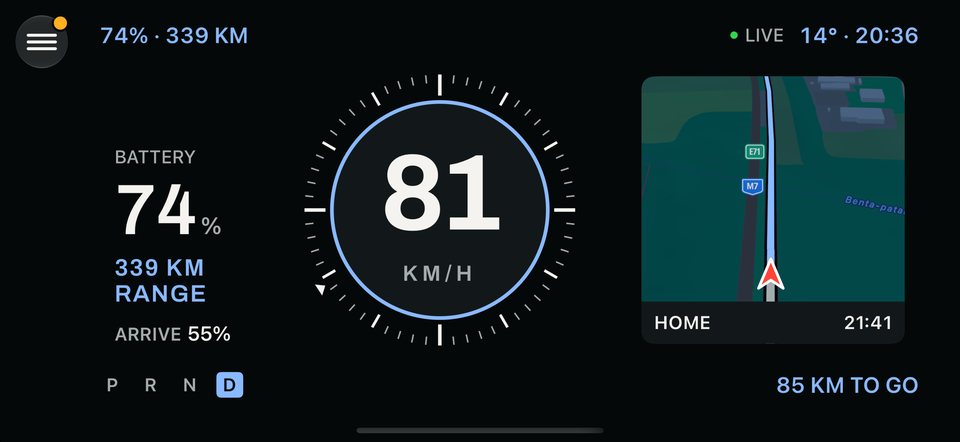
Round Dial · Pro. A round dial with a clear center reading. 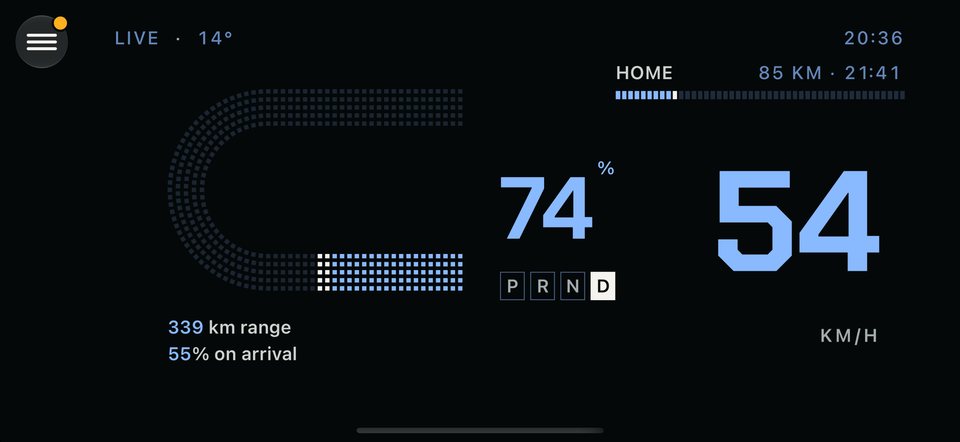
Dotted · Pro. A minimal dotted style for a quiet look.


Swipe or scroll to see more faces. Screens are design previews and may differ from the final app.
Features
Everything you need to see, nothing in the way.
Live cluster faces
From classic twin gauges to quiet, minimal layouts. Swipe to switch faces.
Direct over Bluetooth
Talks to your car directly: no Tesla account login, no extra hardware.
Navigation in your clusterPro
Apple Maps route view next to your speed, with destination, ETA and distance to go. Routes are calculated by Apple, which receives your car’s position and the destination.
Energy at a glancePro
Live power and regen in kW, energy use in Wh/km and a graph of your last 10 km.
Tire pressure
All four pressures on one screen, as the car last read them, with a clear warning when one needs checking.
Make it yoursPro
Eleven accent colors, three numeral typefaces, per-face toggles and km/h or mph.
Built for real drives. A LIVE indicator on every face shows the numbers are current. Stale or lost data is clearly marked, never shown as if it were live.
Setup
Set up once, in guided steps.
Have your key card ready, then follow the in-app setup. After that, just open ClustR when you get in.
Find your key card
You need it once, to prove you own the car. Nothing is written to it.
Sit in the car
ClustR talks to your car over Bluetooth, so your iPhone has to be inside and the car awake.
Enter your VIN and pair
Copy your VIN from the Tesla app and pair. ClustR adds its own phone key (driver role) to your car, and you are done.
Drive safely. Set up your faces while parked. Use a secure phone mount that does not block your view, airbags or controls, and follow your local laws. ClustR is a secondary display: your car’s own displays always come first.
Pricing · planned
ClustR Pro – To the cluster and beyond.
Glance is free. ClustR Pro unlocks every other face, as new ones arrive, plus the map view, energy graph and customization.
- Free: the Glance face, live basic data, tire pressure and demo mode.
- Pro: all other faces and new faces as they arrive.
- Pro: Apple Maps route view, trip history, energy graph and charging cost.
- Pro: accent colors, numeral typefaces and per-face toggles.

Planned plans
Yearly
$29.99 / year
7-day free trial · preselected
Monthly
$2.99 / month
3-day free trial
Lifetime
$59.99 one time
Pay once, keep Pro. Launch price for a limited time.
These are planned prices and may change before launch. Prices shown in USD; final prices in your App Store region and any trial availability are shown in the app/App Store. Subscriptions renew automatically unless canceled at least 24 hours before the end of the current period. Manage or cancel any time in your Apple Account settings.
Trust
What ClustR does with your car and your data.
The short version, with the full detail on the privacy page.
No accounts.No Tesla account and no ClustR account.
No ClustR server.Your driving data, vehicle data and VIN are never sent to the developer, except the car’s model and model year in the optional usage statistics.
Your key stays on your iPhone.The pairing key lives in your iPhone’s Keychain. The VIN is kept in a protected file that is excluded from backups.
No ads, no cross-app tracking.Usage statistics and crash reports are off by default and only start if you switch them on in Settings.
Plain about how it connects.At setup, ClustR adds its own phone key to your car using your key card. It is a real key with the driver role, not a read-only one. While connected, ClustR sends a wake command so data keeps flowing; it does not lock, unlock, start or drive the car. To calculate routes, your car’s position and the destination go to Apple Maps. Apple handles payments, and RevenueCat manages purchase status using a random, pseudonymous ID.
FAQ
Questions, answered.
Is there an iPhone app that works as an instrument cluster or speedometer for Tesla Model 3 and Model Y?
ClustR – Display for Tesla is built for exactly that. Model 3 and Model Y have no display behind the wheel; ClustR turns an iPhone mounted in landscape into a live instrument cluster that shows speed, gear, battery and range over Bluetooth. It is an independent app and is coming soon to the App Store; it is not available there yet.
Does ClustR need a Tesla account or any extra hardware?
No. There is no Tesla login and no ClustR account, and no extra hardware is needed: ClustR talks to your car directly over Bluetooth. During setup you need your key card once, you sit in the car, and you enter your VIN, which you can copy from the Tesla app. The only paid part is the optional ClustR Pro, billed by Apple.
Does ClustR need an internet connection or a ClustR server?
ClustR has no server of its own. Live vehicle data such as speed, gear, battery, range and tire pressure comes straight from the car over Bluetooth and is processed on your iPhone. Only features that use Apple Maps, such as the Pro route view, send your car’s position and the destination to Apple so it can calculate routes.
Is ClustR affiliated with Tesla?
No. ClustR is an independent app and is not affiliated with, endorsed by, sponsored by or approved by Tesla, Inc. It is designed for Tesla Model 3 and Model Y. Tesla, Model 3 and Model Y are trademarks of Tesla, Inc., used only to describe compatibility.
Is it safe to use ClustR while driving?
ClustR is a secondary display. Set up your faces while parked, use a secure mount that does not block your view, airbags or controls, and follow your local laws. Your car’s own displays always take precedence.
What is free and what is ClustR Pro?
The Glance face is free, along with live basic data, tire pressure and demo mode. Every other face, the Apple Maps route view, trip history, energy graph, charging cost and customization are part of ClustR Pro. Planned prices are in the pricing section above and may change before launch. Purchases are handled by Apple; manage subscriptions in your Apple Account settings.
What data does ClustR collect?
No Tesla account, no ClustR account and no ClustR server: your driving data, vehicle data and VIN are never sent to the developer, except the car’s model and model year in the optional usage statistics. The pairing key stays in your iPhone’s Keychain. There are no ads and no cross-app tracking. Route requests go to Apple Maps, and purchases are handled by Apple and RevenueCat using a random, pseudonymous ID. Usage statistics and crash reports (Google Firebase) are off by default and only start if you switch them on in Settings. Read the full explanation on the privacy page.
How do I set up ClustR, and which iPhone do I need?
Follow the guided in-app setup: have your key card ready, sit in the car and enter your VIN. ClustR adds its own phone key (driver role) to your car, and you can remove that key at any time in the car’s key list. Then mount your iPhone in landscape in your line of sight. ClustR is for iPhone and runs in landscape; the required iOS version will be shown on its App Store page, and the app is in English at launch.
Put a cluster
behind the wheel.
Mount your iPhone, pair once, and keep the essentials in view.
Not affiliated with Tesla, Inc. Tesla is a trademark of Tesla, Inc.